Microsoft Scout vs Copilot Cowork: where should enterprise AI agents actually run?
The short version
Microsoft is framing its new agent lineup along one axis: execution vs. autonomy. Cowork executes the tasks you give it. Scout, the first "Autopilot," works in the background without prompts.
That framing is accurate. I just don't think it's the framing that matters most.
After spending two days hands-on with Scout, I'm convinced the question CIOs and CISOs should ask first is a different one:
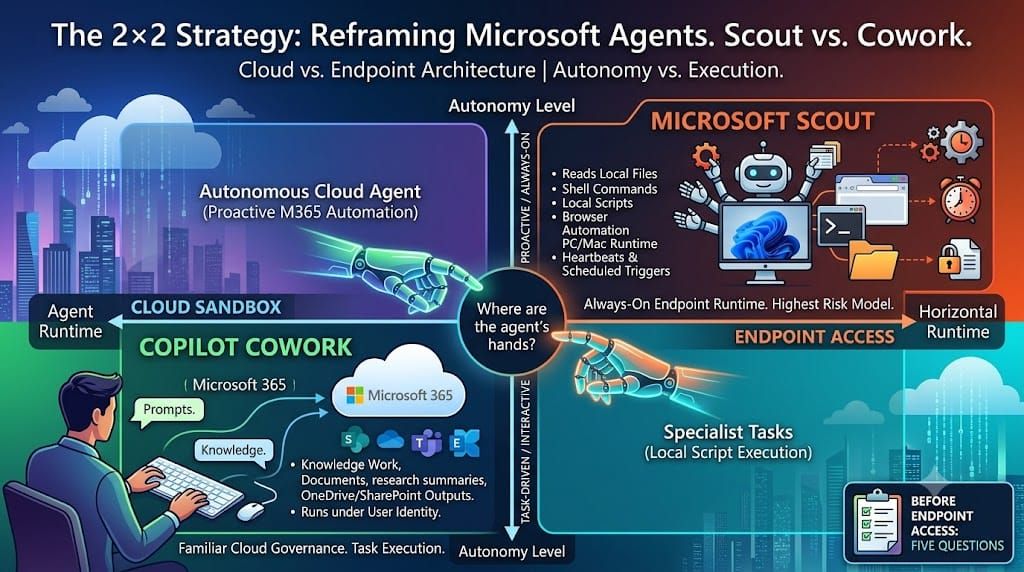
Where are the agent's hands — inside a governed cloud workspace, or on the user's endpoint?
Because that's the real architectural split. Cowork runs in a protected cloud sandbox, inside Microsoft 365 security and governance boundaries, under the user's identity, with outputs landing in OneDrive and SharePoint. Scout runs on the user's Windows 11 PC or Mac, and can read local files, execute shell commands, run scripts, and automate a browser.
One product extends the Microsoft 365 control plane. The other extends the endpoint.
My recommendation, up front: use Cowork-style cloud execution as the default for Microsoft 365 knowledge work. Grant Scout-style endpoint execution only when the use case actually requires the local machine. The rest of this post is the reasoning — and a checklist you can use before granting any agent endpoint runtime.
Two axes, not one
Microsoft's own comparison puts Cowork and Scout on a single spectrum: a task-driven assistant you trigger, versus an always-on agent that acts proactively within boundaries you set.
I'd draw it as a 2×2 instead:
| Cloud runtime | Endpoint runtime | |
|---|---|---|
| Interactive (you trigger) | Copilot Cowork | — |
| Autonomous (always-on) | Cloud-hosted Autopilots (coming) | Microsoft Scout |
Scout doesn't occupy one new position. It occupies two at once: it's autonomous and it lives on the endpoint. Each of those is a meaningful architectural decision. Combined, they multiply.
An interactive agent on your desktop acts when you're watching. An always-on agent on your desktop acts on heartbeats and scheduled triggers — every 15 to 120 minutes, including while you're away. The same local file access, shell access, and browser control, but without a human in the loop at the moment of action.
That's not a feature comparison. That's a different risk model.
A practical decision frame
Before the reasoning, here's the frame I'd use with customers.
Use Copilot Cowork when the work is Microsoft 365 knowledge work:
- Meeting preparation, inbox and calendar assistance
- Document generation, research summaries, stakeholder communication
- Follow-up drafting, launch planning, business memos
- Anything that should land in OneDrive or SharePoint
- Workflows where the Microsoft 365 permission model is the right boundary
None of this needs shell access. None of this needs a local desktop folder. If the endpoint is unnecessary, adding it to the architecture only adds risk and complexity.
Use Microsoft Scout when local execution is the business requirement:
- Repositories, scripts, builds, tests — developer and operator workflows
- Local file and workspace automation
- Browser automation where a SaaS application has no clean API or connector
- Local MCP servers, local tools, endpoint-specific checks
Here, Cowork's limitation is intentional — it cannot access or edit local device files — and Scout's local access isn't a weakness. It's the product. I would never argue Scout has no place. For these roles, it's exactly the right tool.
Be careful with the middle ground. "We want an agent that helps employees with everything" is where governance gets messy. Enterprise AI should not start with maximum access. It should start with the minimum execution environment required to complete the work.
What two days with Scout taught me
I ran a hands-on Scout pilot at Gloster. Two observations stood out — one about capability, one about friction.
The capability is real. Scout selecting tools, working through multi-step tasks across local files and Microsoft 365, launching sub-agents for parallel research — this is a genuinely new class of product, and it works.
But the onboarding friction tells its own story. To run Scout today, you need: enrollment in Microsoft's Frontier program, a Microsoft Scout Intune policy configured and deployed per device, a GitHub Copilot Business or Enterprise license (that's where consumption is billed), and a signed acknowledgment that Scout may process data outside the standard Microsoft boundary if Copilot is configured to use external models. And it's still an experimental preview.
Read that list again. Microsoft itself is treating endpoint agent runtime as something that requires device management, explicit licensing, and informed consent — not something you switch on for the whole company.
That's not a criticism. That's confirmation. Scout is being shipped as a specialist runtime, and that's exactly how enterprises should adopt it.
The identity question nobody puts on the slide
There's a governance detail that matters more than most feature rows: who is the actor?
Cowork acts under the user's Microsoft 365 identity and permissions. When Cowork creates a document or sends a draft, the audit trail points to a person, scoped by that person's existing access.
Scout has its own governed Entra identity — not user-bound. It's an agent acting as an agent, with its own identity object, its own permission scope, its own entry in your directory.
This is the right long-term direction (it's the whole premise behind Agent 365-style governance), but it changes operational questions your security team has answers for today:
- Whose permissions apply when the agent touches a SharePoint site?
- What does the audit log show when an autonomous action goes wrong at 2 a.m.?
- How do conditional access, DLP, and sensitivity labels evaluate an agent identity versus a user identity?
- Who reviews and recertifies agent identities the way you recertify user access?
Purview enforcement and approval gates for sensitive actions are built in — Microsoft has clearly thought about this. But "the controls exist" and "your organization has operationalized them" are two different statements. The second one is your job, not Microsoft's.
Why the endpoint changes the blast radius
Enterprise IT has spent a decade reducing unmanaged endpoint risk. Always-on endpoint agents reverse the direction of travel: the device is no longer just something a human uses, it's part of an autonomous agent's runtime.
The governance surface grows accordingly. Which local folders are in scope? Which shell commands? Which browser sessions, cached tokens, local credentials? What happens when the device is offline, compromised, or misconfigured — while a heartbeat automation is scheduled to fire?
Cowork avoids this entire category of questions by never touching the endpoint. Business context lives in Exchange Online, Teams, SharePoint, OneDrive — and Cowork works from that context, under the identity, sharing, compliance, and audit model you already operate.
AI projects rarely fail because the model is weak. They fail because the operating model is unclear. Starting from a familiar control plane is a major adoption advantage.
What this means for your AI strategy
Most companies are still treating AI adoption as a licensing and training question. The next phase is an agent runtime strategy: which agents run inside Microsoft 365, which run in cloud sandboxes, which may touch endpoints, what requires approval, where outputs land, how agent identities are reviewed and retired.
The principle is least privilege, extended one level:
Not only what data can the agent access — but where is the agent allowed to act.
A cloud sandbox is not always enough. A desktop agent is not always too much. But runtime should be a deliberate design choice, and for mainstream Microsoft 365 work, the cloud sandbox is the right starting point. Endpoint access should be granted when the use case earns it.
Five questions before you grant an agent endpoint runtime
Screenshot this. Answer it honestly before any Scout-class deployment:
- Does the work actually require the local machine? If the inputs and outputs all live in Microsoft 365, the answer is no — use the cloud runtime.
- Who is the actor, and what will the audit log show? Can you explain, today, how an agent identity appears in your logs, conditional access, and DLP evaluations?
- What is the blast radius while no one is watching? List the folders, commands, browser sessions, and credentials in scope during an autonomous, scheduled run.
- What requires human approval — and is that enforced or assumed? Sensitive actions should be gated by policy, not by hope.
- How does this agent get reviewed, recertified, and retired? If you can't answer the lifecycle question, you're not deploying an agent. You're accumulating one.
If a use case passes all five, Scout is a powerful specialist runtime and you should use it with confidence. If it doesn't, Cowork-style cloud execution will do the work with a fraction of the governance surface.
The strategic mistake would be choosing based on demo excitement instead of execution architecture.
Sources and further reading
- Microsoft 365 Blog — Introducing Microsoft Scout: Your always-on personal agent: https://www.microsoft.com/en-us/microsoft-365/blog/2026/06/02/introducing-microsoft-scout-your-always-on-personal-agent/
- Microsoft Learn — Microsoft Scout overview: https://learn.microsoft.com/en-us/microsoft-scout/overview
- Microsoft Learn — Get started with Microsoft Scout: https://learn.microsoft.com/en-us/microsoft-scout/get-started
- Microsoft Learn — Microsoft Scout common questions: https://learn.microsoft.com/en-us/microsoft-scout/faq
- Microsoft 365 Blog — Copilot Cowork: A new way of getting work done: https://www.microsoft.com/en-us/microsoft-365/blog/2026/03/09/copilot-cowork-a-new-way-of-getting-work-done/
- Microsoft Learn — Get started with Copilot Cowork: https://learn.microsoft.com/en-us/microsoft-365/copilot/cowork/get-started
- Microsoft Learn — Manage Copilot Cowork for your organization: https://learn.microsoft.com/en-us/microsoft-365/copilot/cowork/cowork-admin-governance
- Microsoft Learn — Copilot Cowork FAQ: https://learn.microsoft.com/en-us/microsoft-365/copilot/cowork/cowork-faq