Copilot Cowork: What It Actually Does, What It Costs, and What Real Users Think
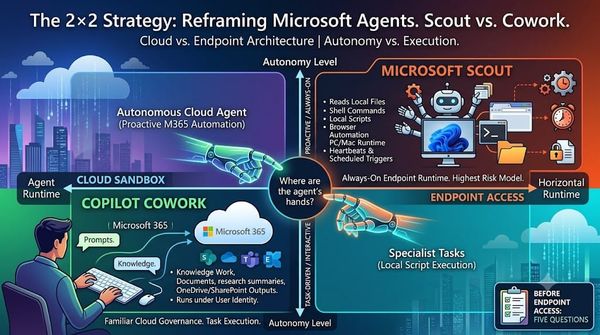
Microsoft 365 Copilot just crossed an important line. With Copilot Cowork, now generally available worldwide as of June 16, 2026, Copilot stops being something you chat with and becomes something you delegate to. You describe an outcome, and Cowork builds a plan, works across your emails, files, meetings and chats, pauses for your approval at key moments, and hands back finished work: a deck, a report, a spreadsheet, even a small app.
For the 70-to-1000-employee organizations we work with every day at Gloster Cloud, this is exactly the kind of shift that separates companies held back by technology from companies empowered by it. But it also comes with a new pricing model that deserves a clear, honest explanation before you switch it on. So we pulled together real use cases, real costs, and real feedback from the people already using it.
How the pricing actually works
Cowork is a premium capability that sits on top of a paid Microsoft 365 Copilot license (the ~$30/user/month seat is a prerequisite). The Cowork work itself is billed separately using Copilot Credits at $0.01 per credit, pay-as-you-go, with prepaid volume discounts available. It is off by default — an admin has to enable it and set spending limits before anyone runs a task.
A task's cost depends on four things: which model runs it, how much context it has to pull in, how many tool calls (outputs and actions) it makes, and how long it runs. Microsoft groups tasks into three rough bands:
| Tier | What it looks like | Credits | Approx. cost |
|---|---|---|---|
| Light | A few sources, light reasoning, one short output | 100–300 | $1–$3 |
| Medium | Multiple sources, structured reasoning, 2+ outputs | 400–700 | $4–$7 |
| Heavy | Broad aggregation, deep reasoning, many outputs | 700+ | $7+ |
A handy shortcut: drop two zeros off the credit count to get the dollar cost. And inside any task you can type /cost to see exactly what it consumed.
Real use cases, with real numbers
We've been running Cowork on our own day-to-day work at Gloster Cloud. Here's what real, useful tasks actually cost us:
- Summarize my day — my tasks and what I've promised: $2.70
- Configure a recurring daily brief: $3.00
- Write a detailed, researched blog post in two languages, with two images: $5.00
- Create a detailed sales offer in two languages, across four iterations: $21.00
The pattern is clear and it matches the pricing tiers. Everyday knowledge work — summaries, briefings, content — lands comfortably in the $1–$5 range. The jump to $21 is the one to learn from: a polished, two-language offer refined over four rounds stacks up multiple outputs, multiple languages, and repeated reasoning. Iteration is where the meter runs, so it pays to brief Cowork well the first time rather than nudging it five times.
Other practitioners showed the range of what's possible:
- Mike Tholfsen demonstrated company research that produces a full Word equity-research report and a five-tab Excel financial model; meeting prep that reads your calendar, Outlook and Teams; a single chained prompt that builds a 10-slide deck, schedules a meeting, and writes a briefing doc in parallel; and even an interactive practice app vibe-coded from pasted content.
- David Buggy generated a complete client-ready service offering from one prompt — overview, statement of work, a multi-tab work-breakdown spreadsheet, a branded PDF, and a PowerPoint — then revised every file at once with a follow-up instruction to cap total effort at 100 hours.
- Office Skills with Amy showed calendar optimization (declining low-value meetings, adding focus blocks after approval) and branded document generation from a template reference.
Put against the cost of a person's time, the math is usually easy: $6 to produce in minutes what would take hours of skilled work is a clear win. The risk isn't any single task — it's unconscious repetition of $1–$10 tasks adding up.
What real users are saying
Our numbers aren't unique. Microsoft MVP Lisa Crosbie published a detailed cost breakdown from her own work that lines up closely with what we see: a training-program outline at ~100 credits ($1); a single slide from rough notes at 224 credits ($2.24); a ~15-page gap analysis squarely in medium ($5–$6); a multi-input, iterated project plan at 609 credits ($6) even though the final output was a single slide; and a full-day workshop build with six deliverables at 997 credits ($9.90). Her takeaway echoes ours — reasoning and back-and-forth iteration are the hidden cost multipliers, and "one output" with six sections is really six outputs.
Beyond the cost data, we went looking for unfiltered reactions on Reddit, across r/sysadmin, r/microsoft_365_copilot, r/CopilotPro, r/copilotstudio and r/msp. The picture is genuinely mixed — strong enthusiasm for the capability, real concern about the bill.
The quality is winning people over. From r/sysadmin: "More powerful, much better at doing what you want, smarter, less AI hallucination… finally getting Copilot to a good spot." On r/copilotstudio, one user found Cowork could handle "almost all tasks" their custom-built Copilot Studio agents and Power Automate flows did — document generation, mail and meeting analysis, report creation — with only third-party-portal integrations (ServiceNow, Genesys) still needing a custom agent.
The pricing is the loudest objection. The top r/sysadmin reaction to a mid-level task costing $4–$7 was blunt: "These guys must be out of their goddam minds." One admin estimated only 1–5% of agents and apps were genuinely worth a per-use cost beyond the base license. On r/microsoft_365_copilot: "We all know how much finance and accounting departments love variable impacts on budgets." And from r/pcmasterrace, the line that captures the mood: "We've officially entered the microtransaction era of productivity software."
Some are weighing alternatives. With no Cowork credits included in the base license, several users on r/CopilotPro asked why pay "$30 + 100% metered" when a competing local agent runs ~$25/month with Microsoft 365 connectors. (The fair counterpoint: Copilot Cowork runs in the cloud inside your M365 tenant, so your existing identity, permissions and compliance boundaries apply automatically — a real advantage for regulated and security-conscious organizations.)
And the honest rough edges, straight from users: it can be buggy and stall on very large tasks; outputs land in a fixed OneDrive session folder rather than a path you choose; there's no local file access; and — importantly — poor tenant hygiene gets amplified. If permissions are too broad or SharePoint is a mess, an agent acting on your behalf inherits all of it, at machine speed.
Prompts worth stealing
The most useful community contribution wasn't an opinion — it was a working method. The framework that separates good Cowork prompts from disappointing ones: be explicit about your Goal (the outcome, not the steps), Inputs (which sources to search), Output (the format), and Boundaries (what needs approval before any action). Think of it as briefing a capable assistant who has full access to your environment but can't ask you questions mid-task.
Proven, repeatable prompts users are running today include a Monday week-start briefing (unanswered threads, open commitments, meetings needing prep), a commitment tracker that scans two weeks of email and Teams for things you promised and never followed up on, a pre-meeting brief that summarizes your last 90 days with an attendee, and a multi-step stakeholder update with one critical instruction — "show me the sources you found before you draft" — which is the single best safeguard against an AI confidently writing up a "decision" that was never actually made.
The Gloster Cloud take
Cowork is the most compelling Copilot experience we've seen for the kind of high-friction, multi-step work that quietly eats your team's week — meeting prep, research, status reporting, document assembly. The transformation is real: your people move from doing the assembly work to supervising it.
But "generally available" doesn't mean "switch it on for everyone tomorrow." The smart rollout looks like this:
- Start with the seat, then meter deliberately. Enable Cowork with a spending cap, not a blank cheque.
- Fix the foundation first. Tighten permissions and clean up SharePoint before agents start reading across everything. We treat this as a Cloud Readiness step, not an afterthought.
- Pick bounded, reviewable use cases. "Compare these documents and flag differences" is a safer, higher-ROI starting point than open-ended delegation.
- Measure with
/cost. Run your real, recurring tasks, see what they actually cost, and build the business case on numbers — not guesses. - Govern it like infrastructure. Spending limits, alerts, audit visibility, and clear accountability for AI-assisted work.
This is precisely the hands-on guidance we provide as a Microsoft Cloud Partner: helping you adopt the technology that moves you faster and works smarter, without the surprise invoice. If your organization is weighing Copilot Cowork, we can help you model the cost, prepare your tenant, and roll it out with confidence.
Unlock the full potential of your business with cloud — let's talk.
Gloster Cloud · gloster.cloud · Microsoft 365 · Azure · Dynamics 365 · Copilot & AI Services
Sources: Microsoft 365 Blog (Copilot Cowork GA, June 16, 2026); Microsoft Learn (usage-based billing & Copilot Credits); YouTube — Lisa Crosbie, Mike Tholfsen, David Buggy, Office Skills with Amy; Reddit — r/sysadmin, r/microsoft_365_copilot, r/CopilotPro, r/copilotstudio, r/msp.