Microsoft Copilot Cowork Just Went GA — Here's What It Actually Means for Your Business (and Your Budget)
By László Földesi, CEO, Gloster Cloud
On June 16, 2026, Microsoft flipped a switch that quietly changes the economics of AI at work. Copilot Cowork — the agentic version of Copilot that doesn't just draft, but does — is now generally available worldwide. After three months in the invite-only Frontier preview, it's out of the lab and into every Microsoft 365 Copilot tenant on the planet.
The launch-day headlines wrote themselves: "More than half the Fortune 500 already used it." "The fastest-growing feature in Microsoft's preview history." All true. But behind the enthusiasm sits a more important story for anyone who actually signs the invoice — because Cowork doesn't just add a feature. It adds a meter.
Here's what's real, what's hype, and what I'd tell any leadership team weighing it up.
Read nothing else? Start here.
If agentic AI is on your 2026 roadmap, these are the six moves that separate the companies that win with Cowork from the ones that get a surprise invoice:
- Don't panic about the price — and don't rubber-stamp it either. Model the cost by persona and realistic task mix, never by flat headcount. The estimator scares people who use it wrong.
- Fix your data governance before you switch it on. Agents amplify existing oversharing problems. Tighten permissions and sensitivity labels first.
- Start narrow. Named users, named workloads, hard spending caps, and an approval step for anything client-facing or production-touching. GA does not mean "everyone, day one."
- Set the guardrails on day one — spending limits, alerts, and a named owner for the meter — before usage ramps, not after the first big bill.
- Separate assistant work from agent work. Quick summaries belong in Copilot Chat (no extra meter). Multi-step, cross-system jobs belong in Cowork.
- Watch for "Cowork 1." If you're cost-sensitive and not in a hurry, Microsoft's cheaper first-party model — due within weeks — could materially change your math.
The companies that win with Cowork won't be the ones that switched it on fastest. They'll be the ones that turned it on with a plan.
From "assistant" to "coworker": the actual shift
For three years, Copilot has been an assistant. It summarized your inbox, drafted a slide, answered a question about a spreadsheet. Useful — but it always handed the work back to you to finish.
Cowork is a different animal. You describe an outcome, and it builds a plan and executes it end-to-end across Outlook, Teams, Excel, Word, SharePoint and your connected systems — then returns a finished result. Clean up a packed calendar and protect focus time. Build a full customer-meeting packet — briefing doc, supporting analysis, client-ready deck, and a draft follow-up email — in one pass. Research a company across earnings reports, filings and news, and get back an executive summary plus a structured Excel workbook.
The simplest way to say it: the assistant helps you think; the worker does the work. Workers cost more when they do more — and that single sentence explains almost everything about the new pricing.
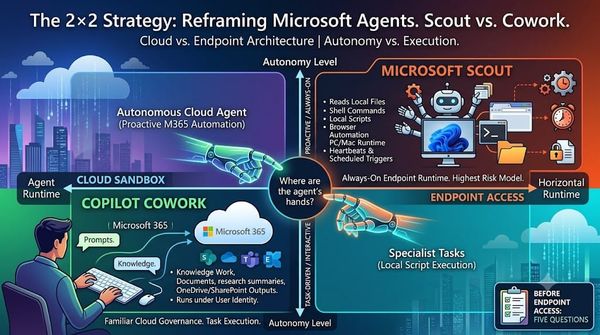
Crucially, Cowork runs in the cloud, inside your Microsoft 365 tenant — not on your laptop. Tasks keep going after you close the lid. It's grounded in "Work IQ," Microsoft's context layer that understands your real emails, files and meetings. And it pauses for your approval before doing anything consequential, like sending a message or booking a meeting.
One detail most coverage skips: at launch, the engine under the hood is Anthropic's Claude (Opus 4.8 and Sonnet 4.6), with Microsoft's own fine-tuned model, "Cowork 1," due shortly. The observation worth making is that the category-defining agentic intelligence currently comes from outside Redmond — Microsoft's contribution is wrapping it in enterprise governance and running it in a compliant cloud. That's a fair pitch, and it matters more than the brand on the model.
What's new at GA — beyond the headline
- Plugins are open. Nine partner plugins are live now (Harvey, LSEG, Miro, monday.com, Moody's, Morningstar, S&P Global Energy, and more), with Adobe, Atlassian, Box, Canva and Databricks coming.
- Native Microsoft integrations. Microsoft Fabric (with Power BI) and Dynamics 365 — Sales, Customer Service, ERP — are now GA inside Cowork, enabling pipeline reviews, case resolution and order approvals.
- Mobile. Cowork runs on iOS and Android — delegate a task on your commute, come back to a finished result.
- Custom skills. Teams can codify their own repeatable workflows (up to 50 custom skills per user).
- Browser use. Cowork can act on the web through a local Edge browser, under your existing enterprise policies.
The part everyone needs to understand: how you pay
This is where leadership attention belongs. Cowork uses a two-layer pricing model:
- A Microsoft 365 Copilot license (~$30/user/month at enterprise list) — the same seat that already powers Copilot Chat and the in-app experiences. This is the predictable part.
- Usage-based billing on top, in "Copilot Credits." This is the new, variable part — and the part that makes CFOs nervous.
Every task's cost is calculated from four inputs: the model it uses, the context it retrieves, the tools it calls, and the runtime it consumes. Pay-as-you-go is $0.01 per credit, or you can pre-commit to a volume (the "P3" plan) for a discount. Microsoft groups tasks into three rough sizes:
| Task size | Example | Est. cost (PayGo) |
|---|---|---|
| Light | A Monday status update | ~$1–2 |
| Medium | A meeting-prep doc + Excel + slide | ~$4–6 |
| Heavy | Classifying six months of data into a leadership report | ~$15+ |
At the task level, that's manageable. But here's the trap already playing out across LinkedIn: someone opens Microsoft's official cost estimator, types in a flat headcount, and emails the result to their CFO. As one widely-shared MVP analysis put it, plug in 100,000 users in a single persona and the tool spits out $20.75 million a month — a number "based on real math applied to a fictional input." Cue the emergency meeting and the frozen rollout.
The estimator is a starting point dressed up as an answer. Model it by persona and realistic task mix, not flat headcount, or you'll scare yourself out of a good decision.
Microsoft clearly knows the anxiety is there. The GA release ships a full cost-management suite: Cowork is off by default, admins set spending limits at tenant/group/user level, configure usage alerts, see per-task cost, and report from a dashboard in the admin center. Tenants that ran a Frontier user get a grace period — no billing until July 1, 2026. And costs should fall over time: the cheaper first-party "Cowork 1" model is imminent, with a possible DeepSeek-based option under consideration for cost-sensitive workloads.
One more number worth a grain of salt: Microsoft says internal testing found Copilot Cowork 30–40% cheaper than Claude Cowork via its M365 connector. Treat that as Microsoft's benchmark, not a neutral buying guide.
What the community is actually saying
The strongest signal from the first week isn't that Cowork is useless — early hands-on reviews are genuinely positive on how well it pulls work together across Microsoft 365. The pushback is about surprise, predictability, and governance.
A widely-cited Substack analysis frames it best: Cowork turns AI from something like a phone plan into something closer to an electricity bill. You pay for consumption, and consumption depends on behavior you can't fully predict upfront. The same piece makes a point every CFO should internalize: falling model prices don't automatically mean falling bills. If the price per unit drops but agents consume far more units, the total can still rise — exactly what happened with cloud compute.
Across Reddit's admin and FinOps communities the recurring themes are: "I thought some credits were included," "a mid-level task is really $4–7 per use?," and "how do I stop one user burning the whole budget?" One indexed thread frames Cowork as "a FinOps problem nobody is ready for" — which is precisely the right category. (Reddit blocks automated scraping, so I treat those as directional sentiment, not audited evidence — but the direction is unmistakable.)
The real risk isn't "high cost." It's unclear value per task.
A $6 Cowork task can be cheap or expensive. If it prepares a sales director for a strategic customer meeting and saves 45 minutes, it's cheap. If it summarizes three emails that Copilot Chat would have handled for free, it's expensive. A $15 task is a bargain if it replaces two hours of analyst work and produces a decision-ready report — and pure waste if someone ran it out of curiosity.
This is the mistake most organizations will make: they'll argue about the price per credit instead of the value per outcome. The right unit isn't cost per prompt. It's cost per successful business outcome. Every serious pilot should track six things per task: what was delegated, how many credits it consumed, whether it completed, how much human time it saved, how much rework it needed, and whether it was worth repeating.
Where Cowork earns its keep — and where it doesn't
Start here (recurring, measurable, genuinely cross-source):
- Weekly executive briefings built from calendar, meetings, key Teams messages, active docs and open follow-ups.
- Customer-meeting preparation for sales and account teams — briefing from email history, CRM, open issues and prior meetings.
- Pipeline risk analysis — stalled opportunities, follow-ups that went cold, suggested next actions (tie it to revenue and ROI defends itself).
- Project status reporting stitched from Teams, Planner, meetings and documents.
- Large-scale document comparison — the kind of work where an agent's higher cost is obviously justified.
Don't route these through Cowork (they belong in Copilot Chat or in-app Copilot, at no extra meter): quick email rewrites, single-document summaries, simple Q&A, short brainstorms, and anything where the user already has all the information open. If users push trivial tasks into Cowork because the interface feels more powerful, you'll pay agent prices for assistant work — the fastest path to disappointment.
The honest caveat: governance has to come first
This is the part I won't sugarcoat, because it's where my own team focuses with clients. A chatbot that writes a summary is low-risk. A long-running, cloud-hosted agent that can touch files, pull business context, call tools and produce operationally-complete output is something else. It needs an owner, permission boundaries, auditability and a budget guardrail before it becomes everyday workflow.
The compliance surface is genuinely strong: Cowork inherits your sensitivity labels and flows through audit logs, eDiscovery, DSPM, Insider Risk and Communication Compliance, respecting each user's existing permissions. But note one gap — Data Loss Prevention (DLP) is still "coming soon." If you operate in a regulated environment, that belongs on your risk register today.
And the oldest Copilot risk hasn't gone away — it's amplified. Cowork can only see what the user can see. In a tenant with oversharing problems (and most have them), that's a lot. Agents make pre-existing data-governance debt expensive, fast.
The guardrails to set on day one
- Keep discovery controlled until billing is configured — don't let curiosity create a finance problem.
- Configure Copilot Cost Management (admin center → Copilot → Cost Management) before pilot users start.
- Use group-based pilot policies — enable a security group, not the whole tenant.
- Set monthly budget limits at tenant, group and per-user level. A pilot without caps is just an open tab.
- Configure alerts so finance, IT and the business owner know when usage crosses a threshold.
- Decide whether new metered services auto-enable — automatic expansion is convenient but creates surprise exposure.
- Teach users to check cost close to the work.
- Review connectors and plugins — more reach means more power and more risk. Connector governance is not optional.
Pro tips from the field
A few things the launch coverage glosses over — pulled from what practitioners are actually sharing on Reddit, YouTube and the licensing community:
- You may already own credits you haven't counted. If your tenant has Copilot Studio capacity packs (25,000 prepaid Copilot Credits per pack, ~$200/month), those are denominated in the same Copilot Credits currency that now powers the metered experiences. Before you switch on fresh pay-as-you-go for Cowork, check what prepaid capacity you're already paying for. Caveat: Microsoft's published credit-policy allocation today is documented for Copilot Chat and SharePoint agents — confirm with your licensing desk whether existing packs can be pointed at Cowork in your tenant, because Microsoft is still expanding which experiences the prepaid pool covers.
- The model picker is a cost lever, not just a quality lever. Microsoft's labels describe what each model does, not what it costs. In community testing of the same task: Sonnet 4.6 ≈ 398 credits ($3.98), Opus 4.8 ≈ 477 ($4.77), GPT‑5.5 ≈ 1,069 ($10.69). Route routine work to the cheapest capable model and reserve the heavyweight for genuinely hard problems — defaulting to "the versatile one" can burn 2–3x your budget on work Sonnet would have done identically.
- Teach users the
/costhabit. Cowork can surface what a task costs as it runs. Make checking cost close to the work a norm, not an afterthought — it changes behavior faster than any policy. - Keep the cheap stuff in Copilot Chat. Quick summaries, single-doc Q&A and email rewrites don't need the meter. If users drift into Cowork out of habit, you pay agent prices for assistant work.
- Watch the usage reports for the first 3–4 weeks. Treat the early period as calibration — learn your real per-persona, per-task costs before you set "final" budgets.
- Codify your best workflows as custom skills. The strongest YouTube tutorials all land on the same point: the value compounds when a team turns a repeatable job (meeting prep, weekly status, customer briefing) into a reusable skill rather than re-prompting from scratch each time.
- CSP-managed tenant? Expect a "billing wall." If a partner manages your tenant, you may be blocked from adding Cowork users at GA until an Azure plan is provisioned through the CSP channel and pointed at Copilot Cost Management. Sort the billing plumbing before your pilot date.
The bottom line
Copilot Cowork is the most consequential thing Microsoft has shipped in the productivity space this year. It's real, it's enterprise-grade, and for the right tasks it genuinely collapses a week of work into a morning. Microsoft 365 is no longer just where work is documented — it's becoming a place where software agents perform the work itself. And from now on, some of that work arrives on the bill.
That's not a reason to wait. It's a reason to move deliberately. Treat Cowork like a managed cloud workload: start with named scenarios, restrict to pilot groups, set budgets before usage, measure cost per successful outcome, separate assistant tasks from agent tasks, and scale only where the economics are clear.
At Gloster Cloud, we help organizations roll out Microsoft 365 Copilot and Cowork the right way — cost modeling by persona, governance and data-readiness, and a controlled pilot that proves value before you scale. Our mission is simple: unlock the full potential of your business with cloud. If agentic AI is on your roadmap for 2026, let's talk.